- Welcome to PogoCheats Forum.

PogoCheats CommunityDownload Cheats | Club Center | Pogo Help
Pogi Constellations | Anagram Solver
Pogo Daily Checklist
Pogi Constellations | Anagram Solver
Pogo Daily Checklist
Posted by Sue
- September 06, 2013, 08:59:43 PMThanks Mayhem and Crazy~Man
I was having the same problem and your solution worked for me.
The graphics was nice to have Crazy~Man
I was having the same problem and your solution worked for me.
The graphics was nice to have Crazy~Man
Posted by C~M
- September 06, 2013, 08:04:32 AMRight click the program and click properties and then choose Compatibility and then checkmark "Run this program as an administrator"
then click Apply and then click OK

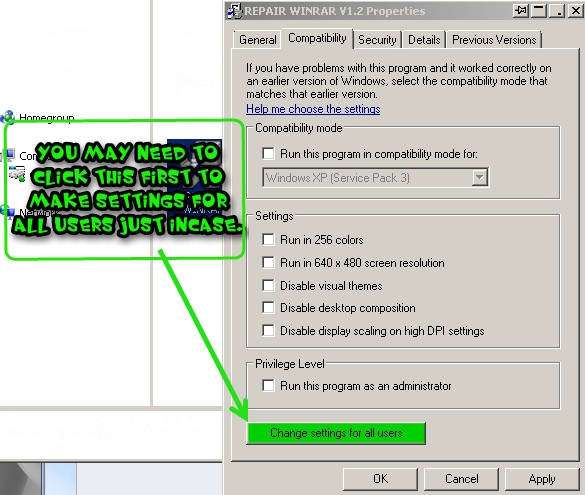
then click Apply and then click OK
Posted by disneyland lady
- September 06, 2013, 06:44:59 AMMore than likely you have your computer set to automatically do your Windows Updates so you don't even know when it happens. Go to START (bottom left) enter WINDOWS UPDATES in the SEARCH and click on WINDOWS UPDATES. To the left of that popup click on VIEW UPDATE HISTORY and it will tell you the last time you updated. Then search for SYSTEM RESTORE and enter a date previous to that last update. I just noticed that I have had 3 updates in the last 2 days.
I really do not understand why my computer would ever tell me that I should run something as Administrator as I am the only person in my home. DUH! And even if I lived with Johnny Depp, I would still be Administrator.
I really do not understand why my computer would ever tell me that I should run something as Administrator as I am the only person in my home. DUH! And even if I lived with Johnny Depp, I would still be Administrator.
Posted by Squid
- September 06, 2013, 05:07:17 AMI am not aware of any Windows update but that doesn't mean it didn't happen. LOL
If I were to perform a "restore", how do I know what date to restore to? I think I should probably follow in your footsteps and create another admin account.
Thanks, Essy.
If I were to perform a "restore", how do I know what date to restore to? I think I should probably follow in your footsteps and create another admin account.
Thanks, Essy.
Posted by essybee
- September 06, 2013, 05:04:25 AMI got this message after a windows update . I restored back to before update and message went away . Fortunately this was one of the windows updates that I had an option to install or not . I also created another account (admin privileges) just in case this happens again . Good luck I know it is frustrating sorry you are going through this . 
Posted by Squid
- September 06, 2013, 03:14:51 AMQuote from: Mayhem on September 05, 2013, 11:38:02 PM
What does it show when you go to : Start > Control Panel > User Accounts ?
It should show your name and your "user role" right below it.
It shows my name and that I am running as administrator and that I am password protected
A temp solution is to 'right click' the program icon and select "Properties". Click on the "Compatibility" tab and 'checkmark' the option "Run this program as administrator" and click "Apply".
I have done this and it has no effect on the outcome. I still am prevented from updating and making changes in that Program File-86. This temporary solution was one that I had come across in my internet search. I tried this as well as a couple of others - no change.
Thanks for trying to help, Mayhem.

Posted by Mayhem
- September 05, 2013, 11:38:02 PMWhat does it show when you go to : Start > Control Panel > User Accounts ?
It should show your name and your "user role" right below it.
A temp solution is to 'right click' the program icon and select "Properties". Click on the "Compatibility" tab and 'checkmark' the option "Run this program as administrator" and click "Apply".
It should show your name and your "user role" right below it.
A temp solution is to 'right click' the program icon and select "Properties". Click on the "Compatibility" tab and 'checkmark' the option "Run this program as administrator" and click "Apply".
Posted by Squid
- September 05, 2013, 08:27:53 PMI am trying to update a program on my puter and have never had a problem until recently. It tells me the update has failed because I have insufficient permissions. When I click on more info, I get this:
Cannot save due to insufficient permissions. Please save to another location. You may not have the necessary permissions or some other application, typically antivirus software, was accessing the downloaded file at the same time as Google Chrome. Try again later or try saving to a different location.
Saving to another location does not help to accomplish the update. I've done searches online and on this forum and all attempted fixes have yielded no results. I don't want to have to run as administrator every time I use this program. Can I set it so that I am ALWAYS running my entire puter as administrator? I've had this laptop for 2 years and have never had this problem. The updates are going to my program files (x86) and it won't let me make changes in that file anymore.
I am running Windows 7. Plenty of RAM and hard drive space. I have tried turning off my antivirus, which did not help.
Any ideas for me? I am not able to discuss which program I am dealing with - sorry.
Cannot save due to insufficient permissions. Please save to another location. You may not have the necessary permissions or some other application, typically antivirus software, was accessing the downloaded file at the same time as Google Chrome. Try again later or try saving to a different location.
Saving to another location does not help to accomplish the update. I've done searches online and on this forum and all attempted fixes have yielded no results. I don't want to have to run as administrator every time I use this program. Can I set it so that I am ALWAYS running my entire puter as administrator? I've had this laptop for 2 years and have never had this problem. The updates are going to my program files (x86) and it won't let me make changes in that file anymore.
I am running Windows 7. Plenty of RAM and hard drive space. I have tried turning off my antivirus, which did not help.
Any ideas for me? I am not able to discuss which program I am dealing with - sorry.